Table of Contents

Search

  1. Preface
  2. Introduction to Informatica Big Data Management
  3. Mappings
  4. Sources
  5. Targets
  6. Transformations
  7. Cluster Workflows
  8. Profiles
  9. Monitoring
  10. Hierarchical Data Processing
  11. Hierarchical Data Processing Configuration
  12. Hierarchical Data Processing with Schema Changes
  13. Intelligent Structure Models
  14. Stateful Computing
  15. Connections
  16. Data Type Reference
  17. Function Reference

User Guide

User Guide

Truncating Partitions in a Hive Target

Truncating Partitions in a Hive Target

To truncate partitions in a Hive target, you must edit the write properties for the customized data object that you created for the Hive target in the Developer tool.
You can truncate partitions in a Hive target when you use the Blaze or Spark run-time engines to run the mapping.
  1. Open the customized data object in the editor.
  2. To edit write properties, select the
    Input
    transformation in the
    Write
    view, and then select the
    Advanced
    properties.
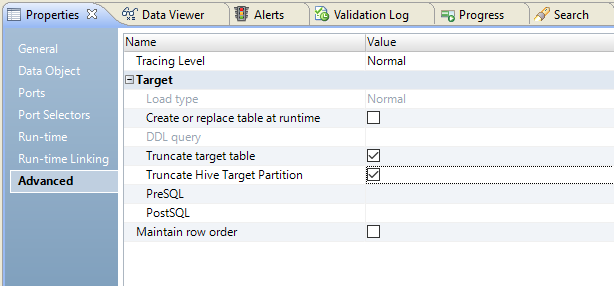
    The following image shows the
    Advanced
    properties tab:
  3. Select
    Truncate Hive Target Partition
    .
  4. Select
    Truncate target table
    .

0 COMMENTS

We’d like to hear from you!