Hi, I'm Ask INFA!
What would you like to know?
ASK INFAPreview
Please to access Ask INFA.

Converting relational input into hierarchical output using Microsoft Azure Data Lake Storage Gen2 Connector

Converting relational input into hierarchical output using Microsoft Azure Data Lake Storage Gen2 Connector

Add a Java transformation

Add a Java transformation

The JSON output generated by the Hierarchy Builder transformation contains data of the string data type. You must use the Java transformation to convert the string data to binary format before you upload data to Microsoft Azure Data Lake Storage Gen2.
A Java transformation has incoming fields and output fields. Use incoming and output fields as variables in the Java code snippets that you define on the
Java
tab. Incoming fields appear on the
Incoming Fields
tab. By default, the Java transformation inherits all incoming fields from the upstream transformation.
  1. Add a Java transformation to the mapping.
  2. On the
    General
    tab, enter a name and description for the Java transformation.
  3. On the
    Incoming Fields
    tab, you can view the incoming fields from the Hierarchy Builder transformation of string data type
  4. On the
    Output Fields
    tab, add output fields for the output data that you want to pass to the downstream transformation.
    1. Click
      Add Field.
    2. Enter a name for the field.
    3. In the
      Type
      field, select
      Binary
      .
    4. Specify the precision, and click
      OK
      .
  5. On the
    Java
    tab, enter the Java code snippet in the
    On Input Row
    section in the following format:
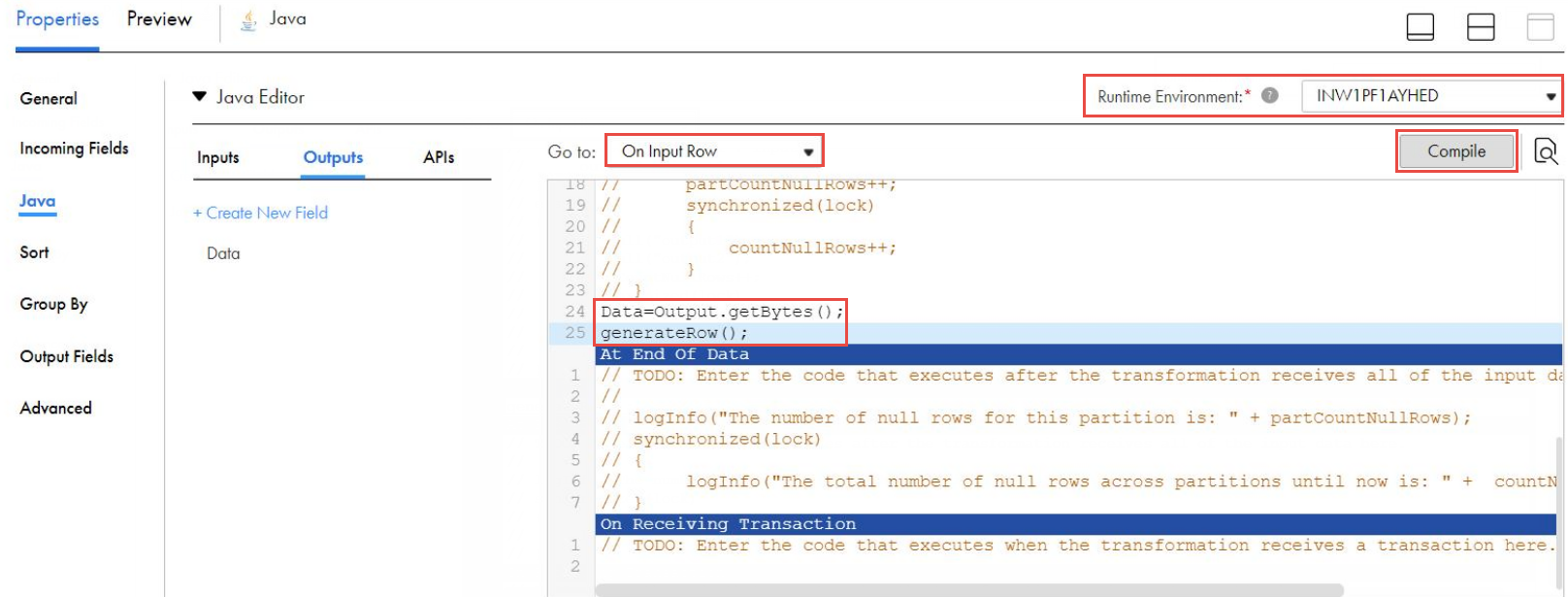
    <output field>=<input field>.getBytes(); generateRow();
    For example,
    Data=Output.getBytes(); generateRow();
    The following image shows the Java code snippet in the Java editor:
  6. Select the
    Runtime Environment
    .
  7. Click
    Compile
    .

0 COMMENTS

We’d like to hear from you!