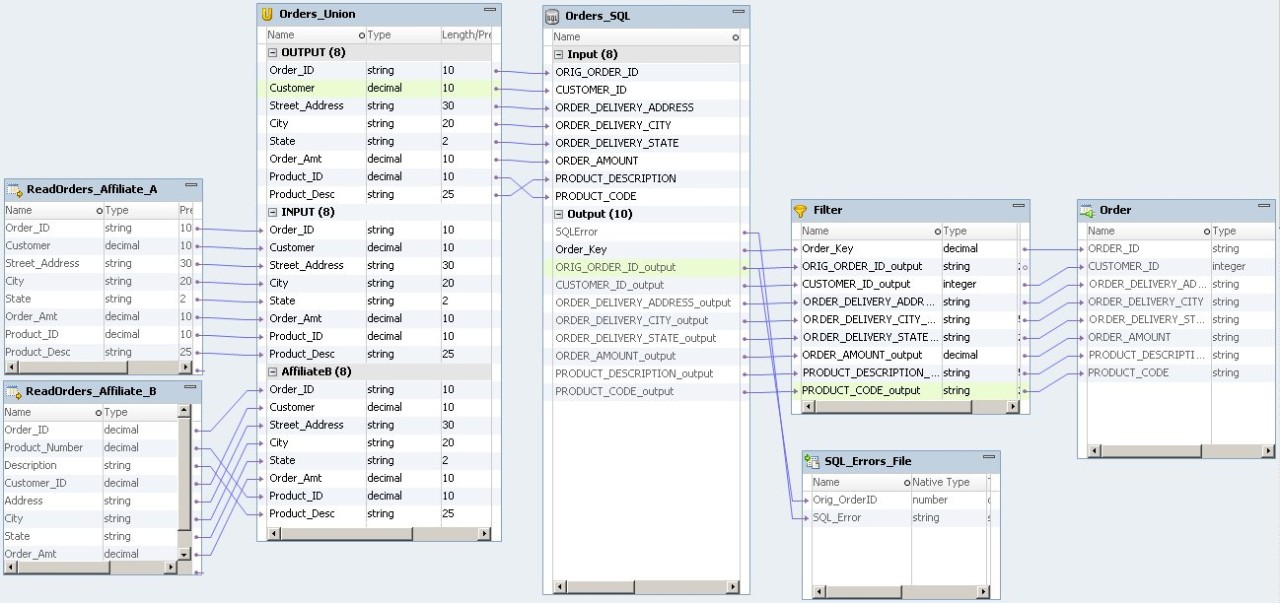
The logical data object mapping describes how you access data through a logical data object. A data object mapping might contain transformations that cleanse or change the data.
For this example, create a logical data object mapping to map the orders from multiple sources to the Order logical data object.
Right-click the Order logical data object in the
Navigator
. Choose
Map Logical Data Object
.
The New Data Object Mapping dialog box appears.
Choose the Read
Type.
Enter a name for the mapping.
The following figure shows a logical data object mapping that creates a single view of the orders:
The mapping contains the following objects:
ReadOrders_Affiliate_A
The input file of orders from affiliate A.
ReadOrders_Affiliate_B
The input file of orders from affiliate B.
Orders_Union
Union transformation that combines the rows from the input files. The Union transformation returns an alpha numeric order number for all orders.
Orders_SQL
SQL transformation that assigns an order number to each row and increments a sequence number in a relational table.
Filter
Filter transformation that filters rows that have NULL order numbers from the mapping.
SQL_Errors_File
Flat file that receives the original customer order number and the SQL error messages that the database might return. The SQL_Errors file has the following structure:
Column
Size
Description
Orig_OrderID
20
Original order number
SQL_Error
4096
Error message
The SQL_Errors file receives two rows for each order because the SQL transformation returns a row for each SQL statement. Each row contains NULL in the SQL_Error column unless the database returns an error message for the SQL statement.
Order
Logical data object that contains the single view of the customer orders. Order receives one row for each order.