You need to keep a data warehouse synchronized with an Oracle production database in near real time.
Your CDC environment has the following characteristics and requirements:
You use PowerExchange 10.4.0 Express CDC for Oracle.
You have an Oracle 12
c
R2 source database on a UNIX machine. The UNIX machine is remote from the PowerCenter Integration Service machine.
You need to capture changes from about 50 Oracle source tables and move the change data in near real time to multiple target tables on a remote machine.
The Oracle source tables are not in an Oracle Real Application Cluster (RAC), Oracle ASM environment, Oracle Data Guard standby environment, or Oracle 12
c
R2 multitenant environment.
The PowerExchange Navigator and PowerCenter Client reside on the same Windows machine, which is remote from the PowerCenter Integration Service machine and Oracle source system.
The PowerExchange Logger for Linux, UNIX, and Windows runs continuously on the Oracle source machine and logs change data records to local Logger log files.
You extract change data from the PowerExchange Logger log files in
continuous extraction mode
. Continuous extraction mode provides near real time access to change data but is much less resource intensive than
real-time extraction mode
.
You do not use offload processing. The Oracle source machine has sufficient memory and resources to handle CDC efficiently.
You use PWXPC connections and PowerCenter workflows to extract the change data from the PowerExchange Logger log files and to write the data to multiple target tables.
PWXPC is a native plug-in that is installed with PowerCenter on the Windows and PowerCenter Integration Service machines.
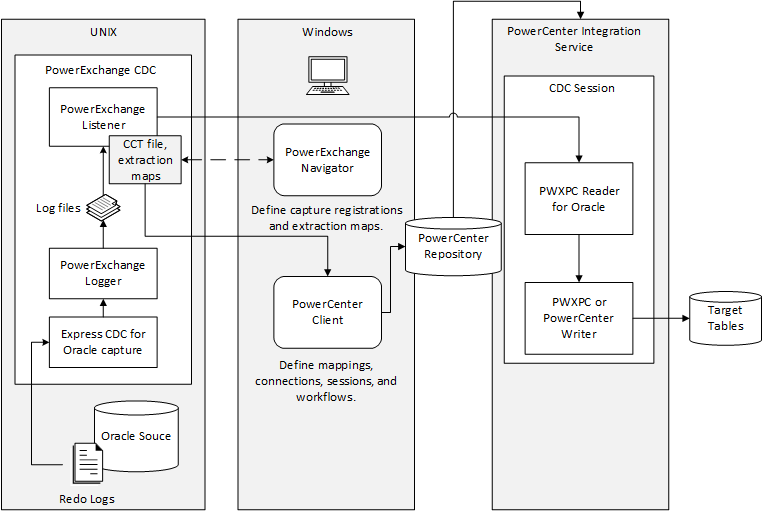
The following image shows the architecture for this scenario:
The UNIX system hosts the Oracle source database, redo logs, and a PowerExchange instance, including the PowerExchange Logger, PowerExchange Listener, CCT file, and extraction maps. The Windows system hosts the PowerExchange Navigator and PowerCenter Client. In the PowerExchange Navigator, you create capture registrations and extraction maps and perform database row tests on the extraction maps. The PowerExchange Navigator reads and updates the CCT file and extractions maps on a UNIX source system. In the PowerCenter Client, you create mappings, connections, sessions, and workflows, which are stored in the PowerCenter repository. The PowerCenter Integration Service machine hosts the PWXPC reader and writer and communicates with the PowerCenter repository, PowerExchange Listener, and target.