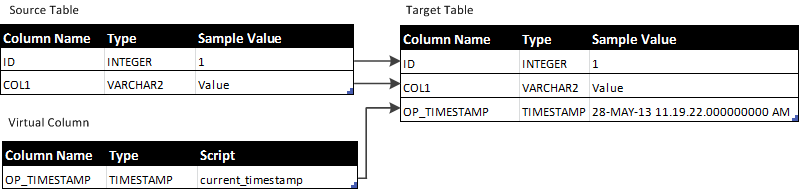
This example shows how to add the current date and time of the target operating system when applying data to the target table. Also, this example shows how to get the creation time stamp of the source change record when applying data.
The following figure shows how the source table columns and virtual column map to the target table columns:
The current_timestamp SQL expression is assigned to the OP_TIMESTAMP virtual column in the source table. The expression gets the current date and time of the target operating system when the Applier applies change data to the target table.
For Oracle targets, use the following current_timestamp SQL expression:
SYSDATE
For Microsoft SQL Server targets, use the following current_timestamp SQL expression:
GETDATE()
Alternatively, the following version of the current_timestamp SQL expression accesses metadata to get the creation time of a record on the source system during apply processing:
:META.REC.OP_DT
This SQL expression is identical for all target database types.
For InitialSync processing, this expression returns a null value.