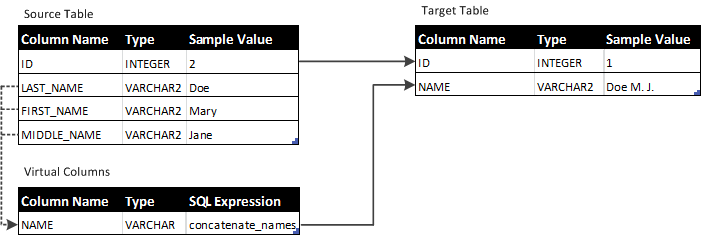
This example shows how to concatenate values of the FIRST_NAME, LAST_NAME, and MIDDLE_NAME columns in a source database to write a single name value into the NAME column in a target database.
The following figure shows how the source table columns and virtual column map to the target table columns:
Use the concatenate_names SQL expression for Oracle targets to concatenate the values of the LAST_NAME, FIRST_NAME, and MIDDLE_NAME columns:
In the following example, the concatenate_names expression is modified to get the LAST_NAME value and to use the Oracle SUBSTR system procedure to append the first letter of the FIRST_NAME and MIDDLE_NAME column values:
Another version of the concatenate_names SQL expression for Oracle targets checks if the REDO value of the MIDDLE_NAME column is null. If the MIDDLE_NAME is not null, the expression uses the Oracle SUBSTR system procedure to append the first letter of the FIRST_NAME and MIDDLE_NAME column values to the LAST_NAME value. If the MIDDLE_NAME value is null, the expression appends only the first letter of the FIRST_NAME column value to the LAST_NAME value.
CASE :NEW.MIDDLE_NAME.IS_NULL WHEN 0  THEN
:NEW.LAST_NAME||' '||SUBSTR(:NEW.FIRST_NAME,1,1)||'. '||SUBSTR(:NEW.MIDDLE_NAME,1,1)||'.'
ELSE :NEW.LAST_NAME||' '||SUBSTR(:NEW.FIRST_NAME,1,1)||'.' END
The same script for SQL Server targets:
CASE :NEW.MIDDLE_NAME.IS_NULL WHEN 0 THEN :NEW.LAST_NAME+' '+SUBSTRING(:NEW.FIRST_NAME,1,1)+'. '+SUBSTRING(:NEW.MIDDLE_NAME,1,1)+'.'
ELSE :NEW.LAST_NAME+' '+SUBSTRING(:NEW.FIRST_NAME,1,1)+'.' END